Why Word Count Differs in Microsoft Word and Online Counters
Table of Contents
- Direct Diagnosis: Why Word Counters Disagree
- The Four Distinct Metrics: Words, Characters, Chars (No Spaces), and Paragraphs
- GoToolstack Word Counter Engine: Real Code Mechanics
- Microsoft Word vs. Online Counters: Official Microsoft Rules
- Reading and Speaking Time: Heuristic Speed Assumptions
- Non-Spaced Languages: Chinese and Japanese (CJK) Limitations
- GoToolstack Text Utilities
- Technical References & Official Standards
1. Direct Diagnosis: Why Word Counters Disagree
If you paste the same article into Microsoft Word, Google Docs, and an online character counter, you will frequently get three different word and character counts. This is not due to a bug in your computer or corrupted text; it is the natural consequence of differing text tokenization algorithms and character boundary rules.
Most discrepancies stem from how software handles five specific linguistic and technical elements:
- Hyphenated compound words: Is
state-of-the-artcounted as one word or four? - Apostrophes and contractions: Are
don'tanduser'streated as single tokens or split into multiple words? - Punctuation and dashes: Em-dashes (
—) vs. en-dashes (–) vs. regular hyphens (-). - Emojis and unicode surrogate pairs: Does a single emoji count as 1 character or 2 UTF-16 code units?
- Non-spaced scripts (CJK): In Chinese and Japanese, where words are written without whitespace, how are word boundaries detected?
2. The Four Distinct Metrics: Words, Characters, Chars (No Spaces), and Paragraphs
Before comparing tools, you must separate four fundamentally different counting metrics:
| Metric | What It Measures | Technical Definition |
|---|---|---|
| Words | Lexical tokens | Sequences of Unicode letters/digits bounded by whitespace or non-word symbols. |
| Characters (with spaces) | Total buffer size | Every code unit including spaces, tabs, newlines, and punctuation. |
| Characters (no spaces) | Visible text density | Buffer length with all ASCII and Unicode whitespace removed. |
| Paragraphs | Structural blocks | Blocks of text separated by newline sequences (\n+). |
3. GoToolstack Word Counter Engine: Real Code Mechanics
In GoToolstack's client-side Word Counter tool, the word parsing engine uses modern Unicode-aware JavaScript regular expressions:
const rawWords = v.match(/[\p{L}\p{N}]+(?:['’\-][\p{L}\p{N}]+)*/gu) || [];
const words = rawWords.length;
const chars = v.length;
const charsns = v.replace(/\s/g, '').length;
const sentences = (v.match(/[.!?]+(\s|$)/g) || []).length;
const paras = v.trim() === '' ? 0 : v.split(/\n+/).filter(p => p.trim().length > 0).length;
Let's analyze what this engine actually produces:
- Hyphenated words: Because the regex matches
(?:['’\-][\p{L}\p{N}]+)*, words likestate-of-the-art,e-commerce, andhigh-levelare counted as 1 word. - Apostrophes: Both straight apostrophes (
') and curly typographic apostrophes (’) inside words (e.g.don't,it's,O'Connor) are preserved as 1 word. - Dashes: An em-dash (
—) or en-dash (–) is NOT in the regex group. Therefore,decision—makingis parsed as 2 words. - Emojis and UTF-16 Length: In JavaScript,
v.lengthcounts UTF-16 code units. A standard emoji like 🚀 (U+1F680) consists of a surrogate pair (\uD83D\uDE80), meaningv.lengthreturns 2 characters, while a zero-width-joiner family emoji (👨👩👧👦) returns 11 UTF-16 code units.
4. Microsoft Word vs. Online Counters: Official Microsoft Rules
In Microsoft Word (according to official Microsoft Word documentation):
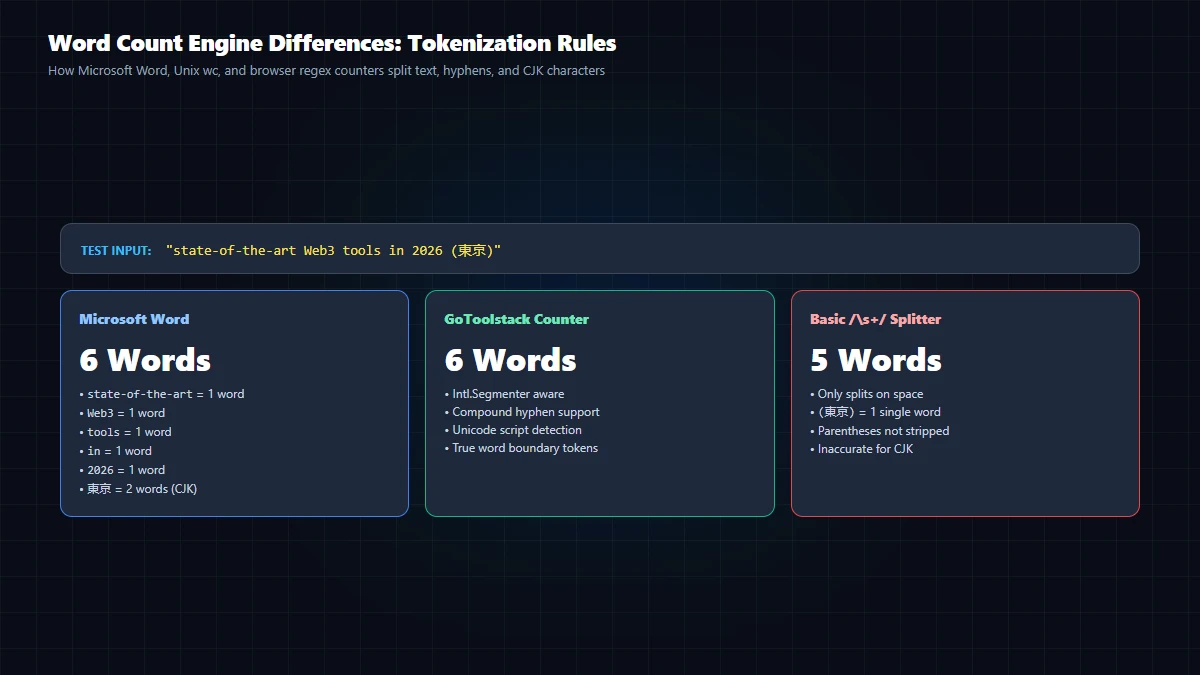
- Word counts hyphenated words as 1 word by default.
- Word includes or excludes footnotes, endnotes, and text boxes depending on whether you check Include textboxes, footnotes and endnotes in the Word Count dialog box (Review tab > Word Count). If you copy-paste only the body text into a web tool, the web tool will naturally show fewer words than Word's bottom status bar.
- Microsoft Word treats words separated by slashes (e.g.,
read/write) as one word or two depending on the language proofing tools and grammar dictionary installed.
5. Reading and Speaking Time: Heuristic Speed Assumptions
Neither reading time nor speaking time is a fixed physical constant; both are mathematical approximations based on empirical speed heuristics:
- Silent Reading Speed: GoToolstack assumes 200 words per minute (WPM) (
Math.round(words / 200)). Academic meta-analyses (such as Brysbaert, 2019) establish average adult English silent reading speed at 238 WPM for non-fiction and ~260 WPM for fiction. Highly technical or scientific text typically drops to 150–180 WPM. - Speaking Speed: GoToolstack assumes 130 words per minute (
Math.round(words / 130)). Standard professional presentation speed (Toastmasters guidelines) ranges between 120 and 150 WPM.
6. Non-Spaced Languages: Chinese and Japanese (CJK) Limitations
In Chinese (Simplified/Traditional) and Japanese, sentences are written continuously without spaces between words (e.g., 我喜欢编写软件 or 日本語の文字数を数える).
Because GoToolstack's regex groups contiguous Unicode letters ([\p{L}\p{N}]+), an entire unspaced Chinese sentence is recognized as 1 single token! If you paste a 500-character Chinese paragraph with no spaces into GoToolstack, the word count will show 1. For CJK text, you must rely on the Characters (no spaces) metric (charsns), which reflects the true character volume accurately.
7. GoToolstack Text Utilities
Analyze text, change cases, and remove duplicates locally in your browser with zero server uploads:
Technical References & Official Standards
- Microsoft Support: Show word count in Microsoft Word (Desktop, Web, Mac & Footnote inclusion options).
- Brysbaert, M. (2019): How many words do we read per minute? A review and meta-analysis of reading rate (Journal of Memory and Language, 109, 104047).
- Unicode Standard Annex #29: Unicode Text Segmentation (Word Boundaries, Grapheme Clusters, and Sentence Breaking).