Why Your Regex Isn't Matching: Flags, Multiline Anchors, and Escaping
Table of Contents
- Direct Diagnosis: Why a Valid Pattern Fails to Match
- The Essential Flags: g, i, m, and s (Never Mix Up m and s)
- Greedy (.*) vs. Lazy (.*?) Quantifiers
- Escaping Characters and the Backslash Trap (Literal vs. Class Context)
- Concrete Examples Tested on GoToolstack Engine
- Engine Differences and ReDoS Catastrophic Backtracking
- GoToolstack Client-Side Developer Tools
- Technical References & Official Standards
1. Direct Diagnosis: Why a Valid Pattern Fails to Match
A regular expression that appears syntactically correct often fails in real applications due to omitted runtime flags, unexpected multiline boundary mismatches, or incorrect string escape sequences. When a pattern matches 0 characters or consumes an entire document instead of a single word, the underlying regex engine is usually executing a different matching model than anticipated.
Before rewriting your pattern, verify these core execution mechanisms in sequence:
2. The Essential Flags: g, i, m, and s (Never Mix Up m and s)
Flags alter the behavioral rules of the regex engine. In JavaScript (and ECMAScript standard), the primary fundamental flags for daily workflows are:
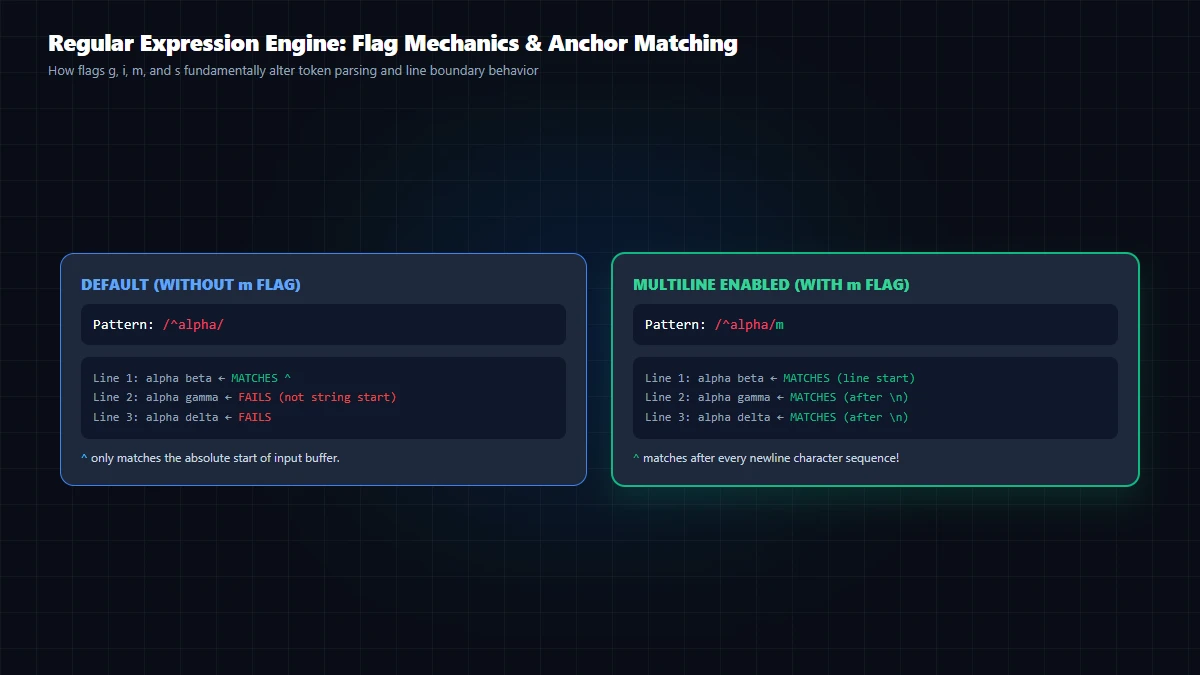
- g (Global): Advances search across the entire string instead of stopping at the first match.
- i (Ignore Case): Disables case sensitivity for matching letters.
- m (Multiline): Makes
^and$match the start and end of each individual line (after and before\n). - s (dotAll): Allows the dot metacharacter (
.) to match newline characters (\n,\r).
CRITICAL DISTINCTION: Multiline (m) does NOT allow the dot (.) to cross newlines! Conversely, dotAll (s) does NOT make ^ or $ match individual line boundaries. Mixing up m and s is the most common cause of multiline extraction failure.
3. Greedy (.*) vs. Lazy (.*?) Quantifiers
By default, quantifiers (*, +, {min,max}) are greedy: they consume as many characters as possible before backtracking to accommodate subsequent tokens.
Consider extracting HTML tags from: <div>First</div><div>Second</div>
Greedy Pattern <div>.*</div>: Consumes the entire string until the final closing tag, returning one massive match instead of individual elements.
Lazy Pattern <div>.*?</div>: The question mark makes the quantifier lazy, causing it to stop at the first matching closing tag (<div>First</div>). However, to extract both independent matches from the string, you must include the global flag (/<div>.*?</div>/g). Without the g flag, the engine halts immediately after the first match.
4. Escaping Characters and the Backslash Trap (Literal vs. Class Context)
Regular expressions reserve syntax characters: \ ^ $ . | ? * + ( ) [ { } ]. Escaping rules depend strictly on syntax context:
- Outside Character Classes: All syntax characters must be escaped with a backslash (e.g.,
\.,\$,\() to match literal punctuation. - Inside Character Classes (
[...]): Most metacharacters lose their special syntactic role and match literally (e.g.,[.]matches a literal dot;[*]matches an asterisk). Only^(negation when at the start),-(range separator),](class terminator), and\(escape character) retain special meaning inside brackets.
When compiling patterns in JavaScript code, distinguish regex literals from string constructors:
// 1. Regex Literal (single backslash required)
const reLiteral = /^\d+\.\d+$/;

// 2. String Constructor (double backslash mandatory)
const reConstructor = new RegExp("^\\d+\\.\\d+$");
5. Concrete Examples Tested on GoToolstack Engine
Each pattern below has been verified against the ECMAScript RegExp engine with real inputs and expected matches:
| Scenario & Input | Pattern & Flags | Expected Verified Match |
|---|---|---|
ERROR 404 /api\nINFO 200 /home\nERROR 500 /db |
/^ERROR\s+(\d+)/gm |
ERROR 404, ERROR 500 |
Total cost: $49.99 USD |
/\$(\d+\.\d{2})/ |
$49.99 |
/* Multi-line |
/\/\*.*?\*\//s |
/* Multi-line |
6. Engine Differences and ReDoS Catastrophic Backtracking
The GoToolstack regex tester executes in the browser's native ECMAScript engine. Keep these limits in mind when porting patterns from Python, PCRE, or Go:
- Lookbehind Support: Modern ECMAScript supports positive
(?<=...)and negative(?<!...)lookbehind assertions. Older legacy engines may throw syntax errors. - No Possessive Quantifiers: JavaScript does not support possessive quantifiers (
.*+) or atomic groups(?>...)found in PCRE and Java. - Catastrophic Backtracking (ReDoS): Nested quantifiers like
(a+)+$cause exponential backtracking on non-matching strings likeaaaaaaaaaaaaaa!, locking up CPU cores. GoToolstack runs regex evaluation inside an isolated Web Worker with strict timeout limits. - The 'Perfect Email/URL' Fallacy: Avoid 500-character monolithic regex patterns that promise 100% RFC 5322 compliance. In production, basic structure checks combined with confirmation tokens are far safer and more maintainable.
7. GoToolstack Client-Side Developer Tools
Debug and build expressions safely in your browser with zero server uploads:
Technical References & Official Standards
- MDN Web Docs: JavaScript Regular Expressions Guide.
- ECMA-262: ECMAScript Language Specification - RegExp Objects.
- OWASP: Regular Expression Denial of Service (ReDoS) Prevention.