Why Your QR Code Won't Scan: Screen and Print Troubleshooting Guide
Table of Contents
- Direct Diagnosis: Optical Decoding Failure vs. Target Network Error
- Technical Core: Contrast, Quiet Zones, and Error Correction
- Step-by-Step Reliable QR Generation Workflow
- Physical Print Sizing: The 10:1 Distance Ratio
- Format Comparison: Vector SVG vs. Raster PNG for Print
- Common Scanning Pitfalls & Troubleshooting
- Hardware Limits & Pre-Print Checklist
- Technical References & Official Standards
1. Direct Diagnosis: Optical Decoding Failure vs. Target Network Error
When a QR code appears non-functional, engineers must decouple two strictly independent technical failure modes:
- Optical Decoding Failure (Camera & Sensor Layer): The camera fails to detect the matrix pattern. No detection box appears and no payload is read. Root causes: insufficient contrast ratio (<4:1), missing quiet zone margin (<4X), blurred print resolution, or obscured corner eyes.
- Target / Resolution Failure (Network & HTTP Layer): The camera instantly and accurately decodes the raw text payload (e.g.
https://example.com/promo), but tapping the link triggers an HTTP 404, an expired redirect, or a network timeout. The barcode itself is 100% mathematically valid; the remote server endpoint is broken.
2. Technical Core: Contrast, Quiet Zones, and Error Correction
Standard QR codes (ISO/IEC 18004:2015) rely on optical computer vision binarization to read black and white modules:
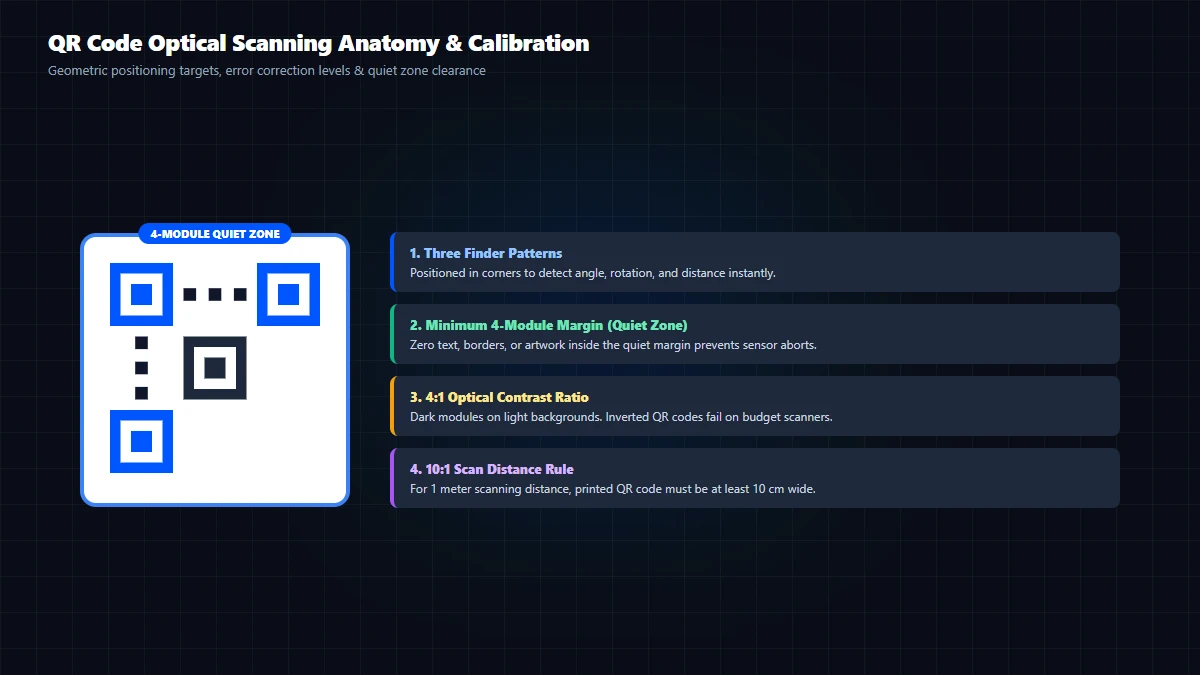
- Quiet Zone Margin (4X): A solid, uninterrupted border of background color at least 4 modules wide must surround all four sides.
- Contrast Ratio (≥4:1): Always use dark modules on a light background. Inverting colors (white modules on dark background) fails on legacy barcode scanners.
- Error Correction Level (ECL): Reed-Solomon algebraic recovery allows Level L (7%), M (15%), Q (25%), or H (30%). When embedding a central logo, Level H (30%) is strictly required.
3. Step-by-Step Reliable QR Generation Workflow
- Input Clean Payload: Open the GoToolstack QR Generator. Enter the destination URL without bloated tracking parameters.
- Select Error Correction: Choose Level M for clean text or Level H if adding a custom logo.
- Ensure High Contrast: Maintain dark modules on white background; avoid pastel colors.
- Export Appropriate Format: Download Vector SVG for commercial printing, or Raster PNG for digital screens.
4. Physical Print Sizing: The 10:1 Distance Ratio
There is no universal print size. Apply the 10:1 distance-to-size rule: viewing distance divided by 10 equals the minimum code width (e.g., 30 cm distance requires a 3.0 cm width; flyers require at least 2.0 cm × 2.0 cm).
5. Format Comparison: Vector SVG vs. Raster PNG for Print
- Vector SVG: Mathematically resolution-independent, scalable from 1 cm to billboards without pixelation.
- Raster PNG: Fixed pixel dimensions, best suited for email signatures, web pages, and presentation slides.
6. Common Scanning Pitfalls & Troubleshooting
1. Inverted Colors (Light Modules on Dark Background)
White modules on dark backgrounds fail on legacy scanners and budget cameras. Always use dark foreground on light background.
2. Cropped Quiet Zone Margin
Cropping the code flush with graphics prevents camera algorithms from isolating finder patterns. Maintain at least 4 modules margin.
3. Logo Overlap on Corner Eyes
Never cover the three 7x7 corner position detection patterns. Logos must remain centered with protective clear padding.
7. Hardware Limits & Pre-Print Checklist
- Check 1: Destination link opens directly over HTTPS and returns HTTP 200.
- Check 2: Quiet zone margin ≥ 4 modules on all four sides.
- Check 3: Contrast ratio ≥ 4:1 with dark modules on light background.
- Check 4: Level H (30%) error correction selected when embedding logos.
- Check 5: Physical proof print scanned with multiple budget and flagship smartphone cameras.
Technical References & Official Standards
- ISO/IEC 18004:2015: Automatic identification and data capture techniques – QR Code bar code symbology specification.
- AIM Global: Uniform Symbology Specification – QR Code.
- W3C WCAG 2.1: Criterion 1.4.3 Contrast (Minimum).